

Understanding Vendekin’s Remote Monitoring Dashboard — vNetra
Updated: Apr 20

You don’t have to guess what’s happening inside your fleet. vNetra is Vendekin’s cloud-based vending machine monitoring software that turns raw device data into actions your team can take right now restock smarter, resolve refunds faster, and close the month without reconciliation drama. This guide walks through the key modules and the quick wins in each.
1) Machines: History, Live Activity, and Statistics
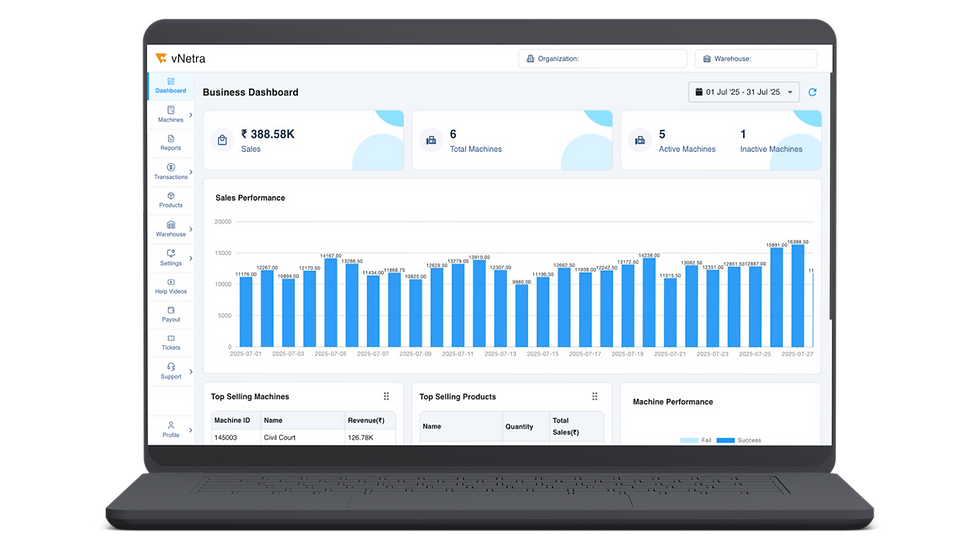
What you see
Fleet view: online/offline, temperature bands (ambient/chilled/frozen), door events, error codes.
Machine card: model, site, 4G SIM, firmware, last heartbeat.
Activity timeline: vends, refunds, faults, door opens with timestamps.
Stats: transactions/day, AOV, conversion rate, payment success %, stockout hours %, uptime.
How to use it
Sort by OOS risk and payment success to prioritize routes.
Click History to correlate a temperature drift with a condenser or gasket alert.
Use Compare to benchmark underperforming sites against top quartile machines.
Quick wins
Set alerts for payment success < 98.5% and stockout hours > 2%.
Nudge housekeeping: a simple glass clean improves QR scan speed → fewer abandons.
2) Reports: One-Click Downloads that Finance Loves

What you get
Sales & Settlement (by device/site/date range, UPI/RFID/cards).
Refunds & Voids with reason codes and operator notes.
Inventory & Expiry (FEFO), stock movement logs.
Uptime & MTTR for SLA reviews.
Energy/Temperature summaries for audits and ESG packs.
Pro tip: Save a monthly Report Bundle template (Sales + Refunds + Uptime + Tax export) so Finance can close books in minutes, not days.
3) Transactions: Cashless, Cash, and Refunds (All in One Trail)

What you see
Ledger view of every transaction: tender type (UPI/RFID/card/cash), status, timestamps, device events.
Drill-down: tap to see vend path, motor/elevator status, and pick-up confirmation.
Refund actions with reason library (failed vend, temp lock, user error).
How to use it
Filter by failed or pending to sweep issues daily.
Export refunds with device logs for dispute-proof documentation.
Watch transaction latency to catch network bottlenecks early.
Quick wins
Add a QR on the bezel: “Payment issue? Scan for instant help.” Customers self-serve, support resolves faster.
4) Products: Planograms That Learn

What you see
Catalog with images, allergens/macros, prices, and tax codes.
Planogram editor by machine/zone/shelf/slot.
Promo engine: bundles, BOGO, daypart offers.
How to use it
Run a 40/40/20 mix (staples/healthy/discovery). Graduate winners to eye level.
Enable FEFO and expiry alerts for dairy/frozen/OTC.
A/B test a water add-on (“₹10 off if cart ≥2”) to lift basket size.
Quick wins
Turn on multi-vend cart + a cross-sell prompt on Combo 22 → typical AOV +15–25%.
5) Warehouses: End-to-End Inventory & Vehicle Control
Modules inside
Purchase Orders (supplier → GRN), Stock-In/Out, Stock Returns, Adjustments.
Inventory by SKU, batch, expiry, and warehouse/site.
Vehicles & Routes: assign loads, track dispatch/receipt, reconcile variance.
Manage Warehouse: locations.
How to use it
Build pick lists from OOS risk + planogram facings, not guesswork.
Enforce batch capture for traceability; FEFO at loading prevents write-offs.
Track load vs. unload variance to reduce shrink and driver disputes.
Quick wins
Cluster routes by near-expiry + OOS to cut truck rolls and wastage together.
6) Tickets: Faster First-Time-Fix

What you see
Ticketing: create from alerts (door, temp, motor, network), assign SLA/owner, attach photos/notes.
Timeline: opened → acknowledged → parts used → closed; MTTR auto-calculated.
How to use it
Link recurring alerts to predefined resolution steps for field teams.
Review repeat-fault machines weekly and schedule preventive visits.
Quick wins
Add a spares kit checklist to reduce repeat trips (belts, fuses, basic tools).
7) Rewards: Close the Loop with Behavior
What you can run
RFID/ID-based entitlements: role/shift subsidies, daily limits.
Wallet credits/cashback for first purchase or bundles.
Campaign rules: campus “study hour” offers, gym “post-workout” combos.
How to use it
Set reward budgets and track ROI in the Promo Lift report.
Use targeted perks at late-evening peaks to smooth refill windows.
8) Custom Dashboards & White Labelling
What you see
Role-based dashboards for Ops, Finance, CX, and Leadership
Configurable widgets: sales, uptime, refunds, OOS risk, MTTR
Brand controls: logo, fonts, colors, and headers
How to use it
Show only exception metrics to Ops, reduce dashboard noise
Give Finance a settlement-first view for faster closes
Share branded dashboards with enterprise clients and landlords
Quick wins
Replace static weekly reports with live KPI dashboards
Use white-labelled reports in QBRs and audits
Reduce internal follow-ups by aligning everyone to one view
Roles & Governance (keep controls tight)
RBAC: separate Ops, Finance, and Content roles.
Maker–Checker: approvals for price changes, promos, and firmware.
Security: TLS, signed firmware, encrypted storage; staged OTA with rollback.
Audit trails: who changed what, when exportable for compliance.
KPIs to Watch Weekly (and the thresholds we recommend)
Payment success ≥ 98.5%
Stockout hours < 2% of trading time
AOV +15–25% with multi-vend + bundles
Uptime ≥ 99%, MTTR trending down
Waste % (expiry/breakage) decreasing with FEFO + elevator
Truck-rolls/1,000 tx improving via route clustering
FAQs (we hear these a lot)
Can vNetra handle multi-country fleets?
Yes, time zones, currency, tax codes, and role scoping per region.
Do refunds reconcile cleanly with UPI/RFID?
Yes, every refund/void is tied to device events and user actions for dispute-free audits.
Is ticketing integrated with alerts?
Yes, alerts can create tickets with SLA/owner; you can attach photos/notes in the field.
Can I restrict who edits prices?
Yes, RBAC + maker–checker prevents unapproved changes.
Conclusion & Next Steps
Great vending machine monitoring software does more than “show data.” vNetra turns device telemetry into route decisions, cleaner finance closes, and faster first-time-fix. Start with alerts and report bundles, then layer in FEFO, planograms, and rewards to compound margins without adding headcount.


Comments